
AREDN
Network Topology
Network Topology
Network Topology is the arrangement of the elements (links, nodes, etc.) of a communication network.
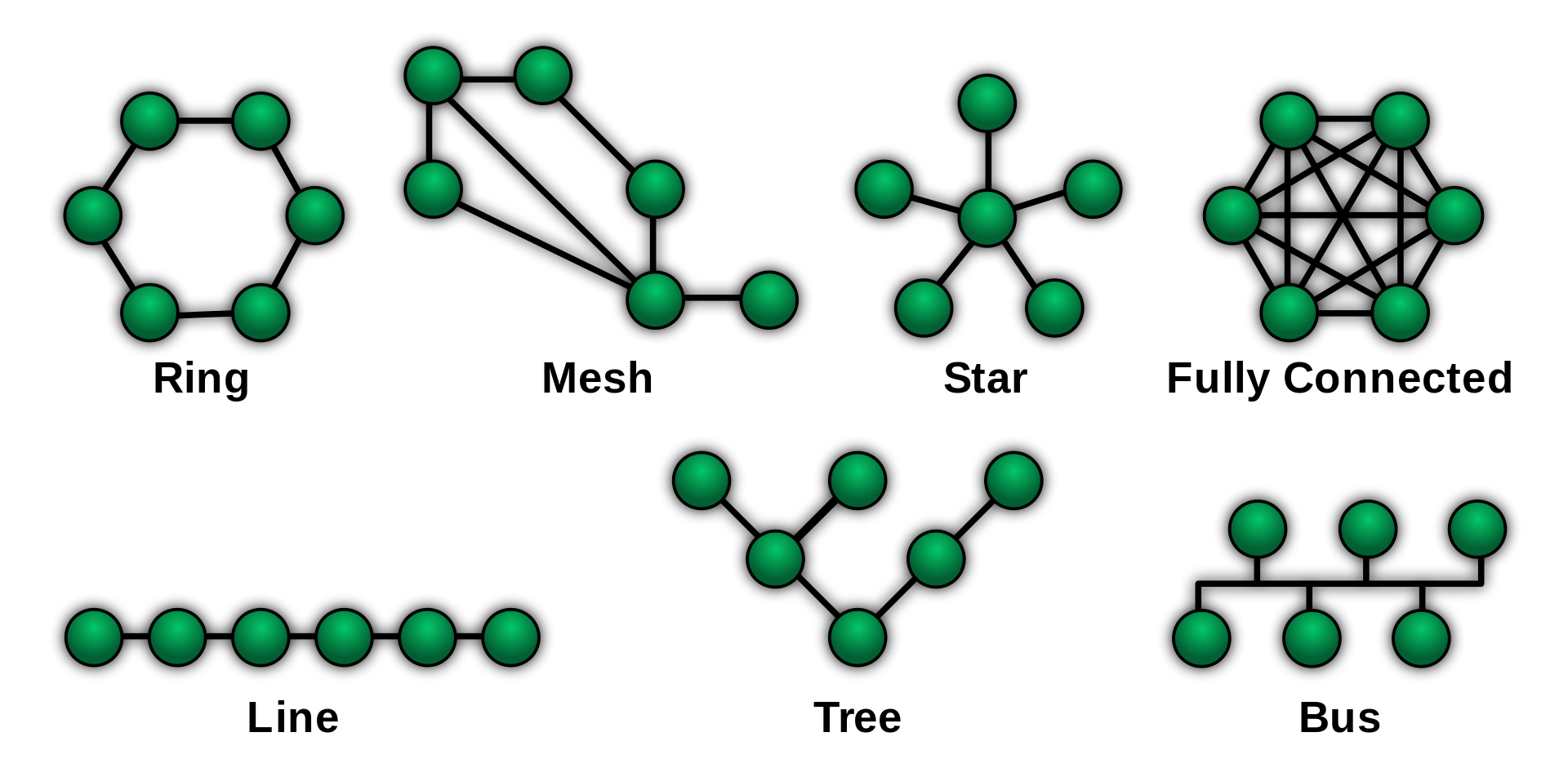
Each have their pros and cons.
Current Topology
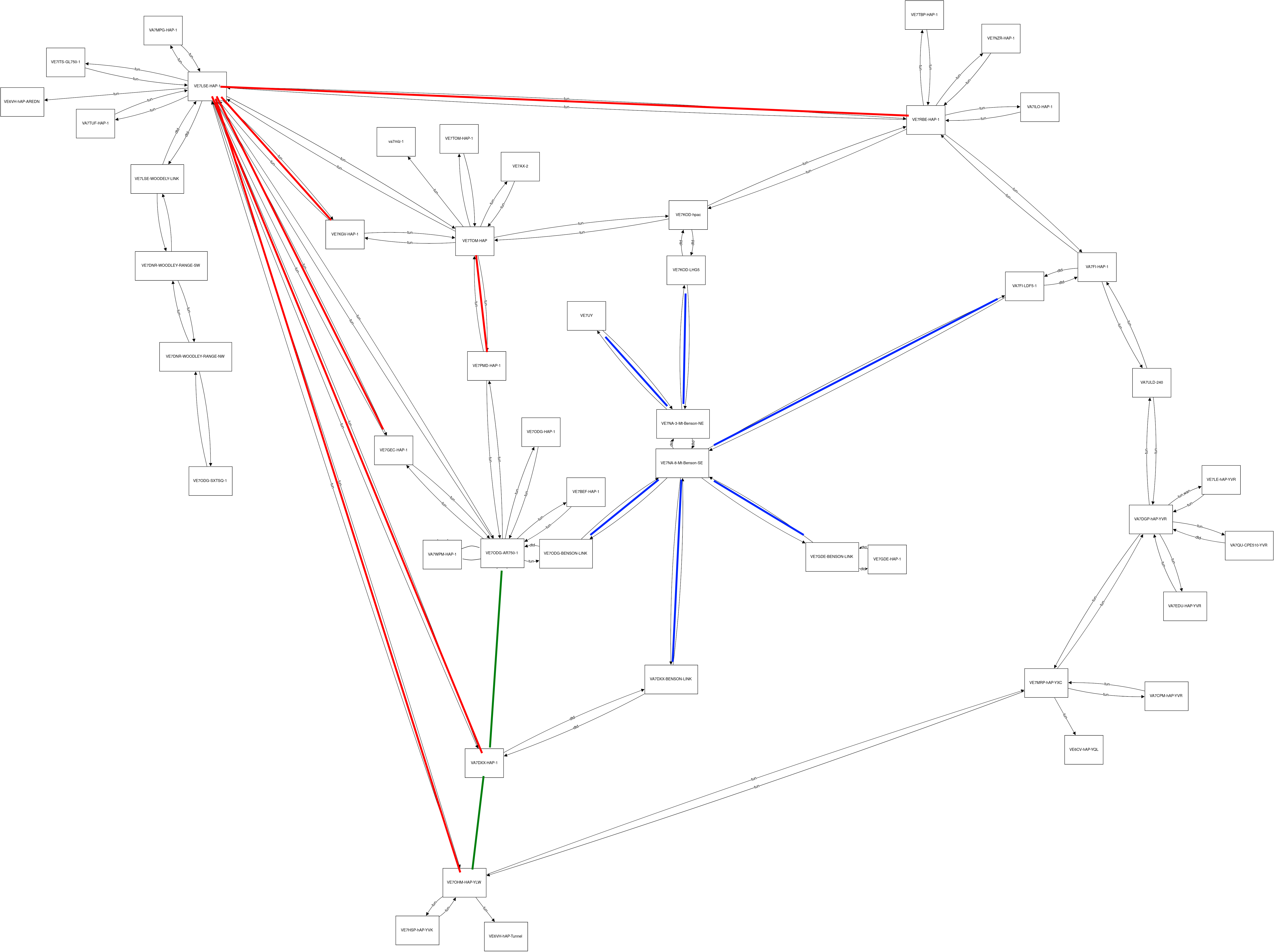
As of November 28, 2021, our network topology (for BC stations only) looks like this:1),2) 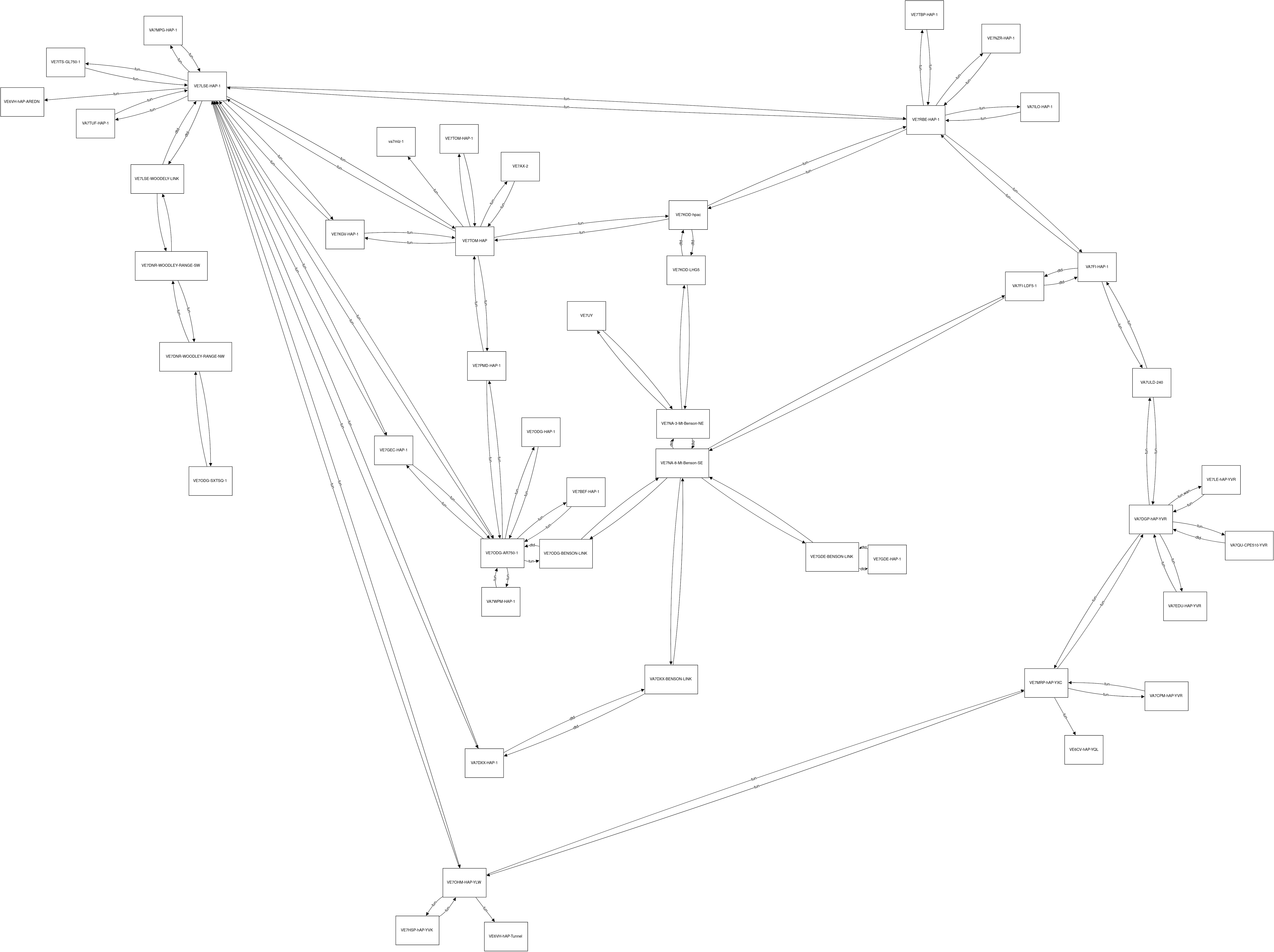
Drawn this way, we can outline the RF links through Benson (in blue), and some of the small internet loops: 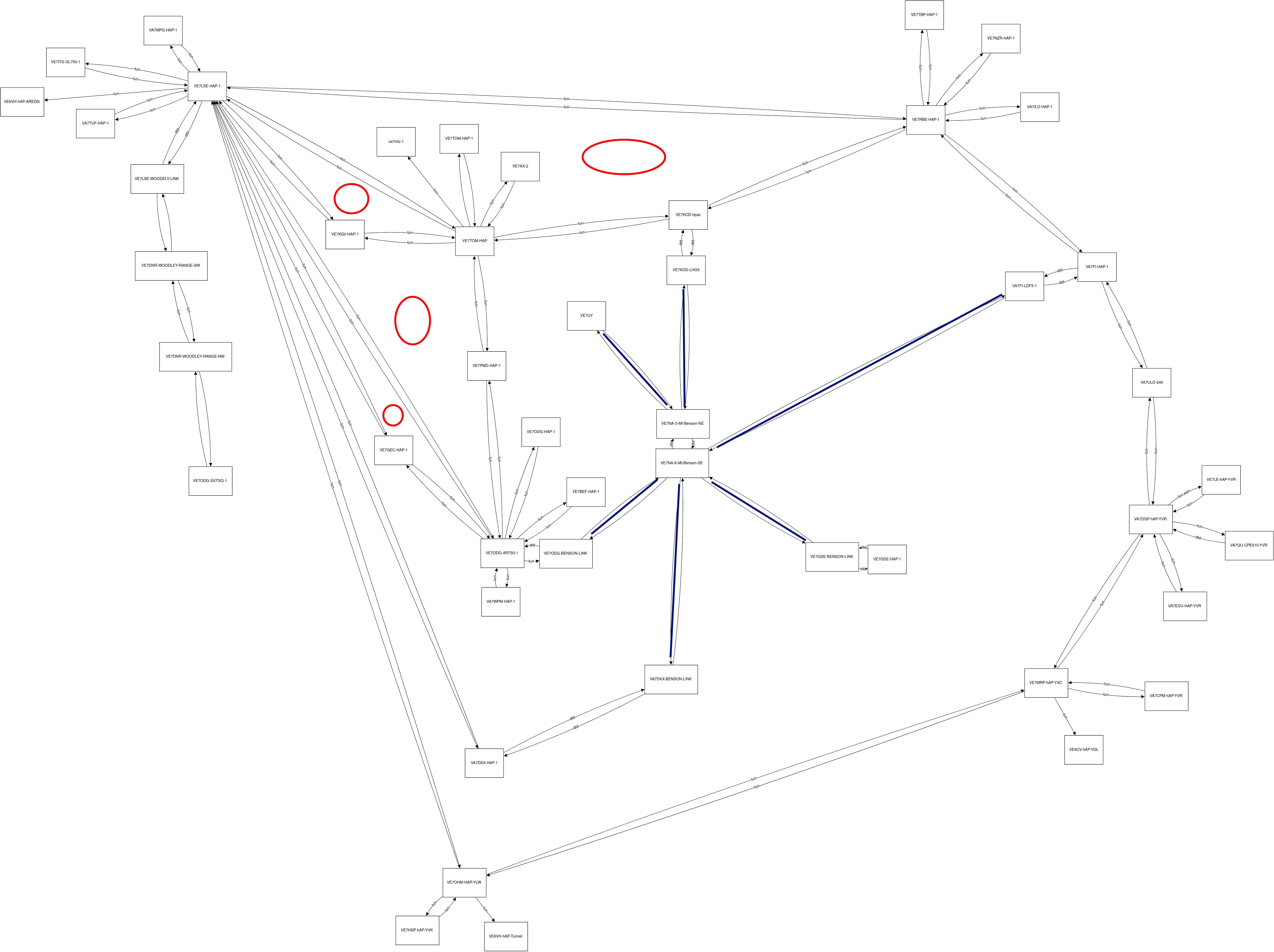
Hybrid System
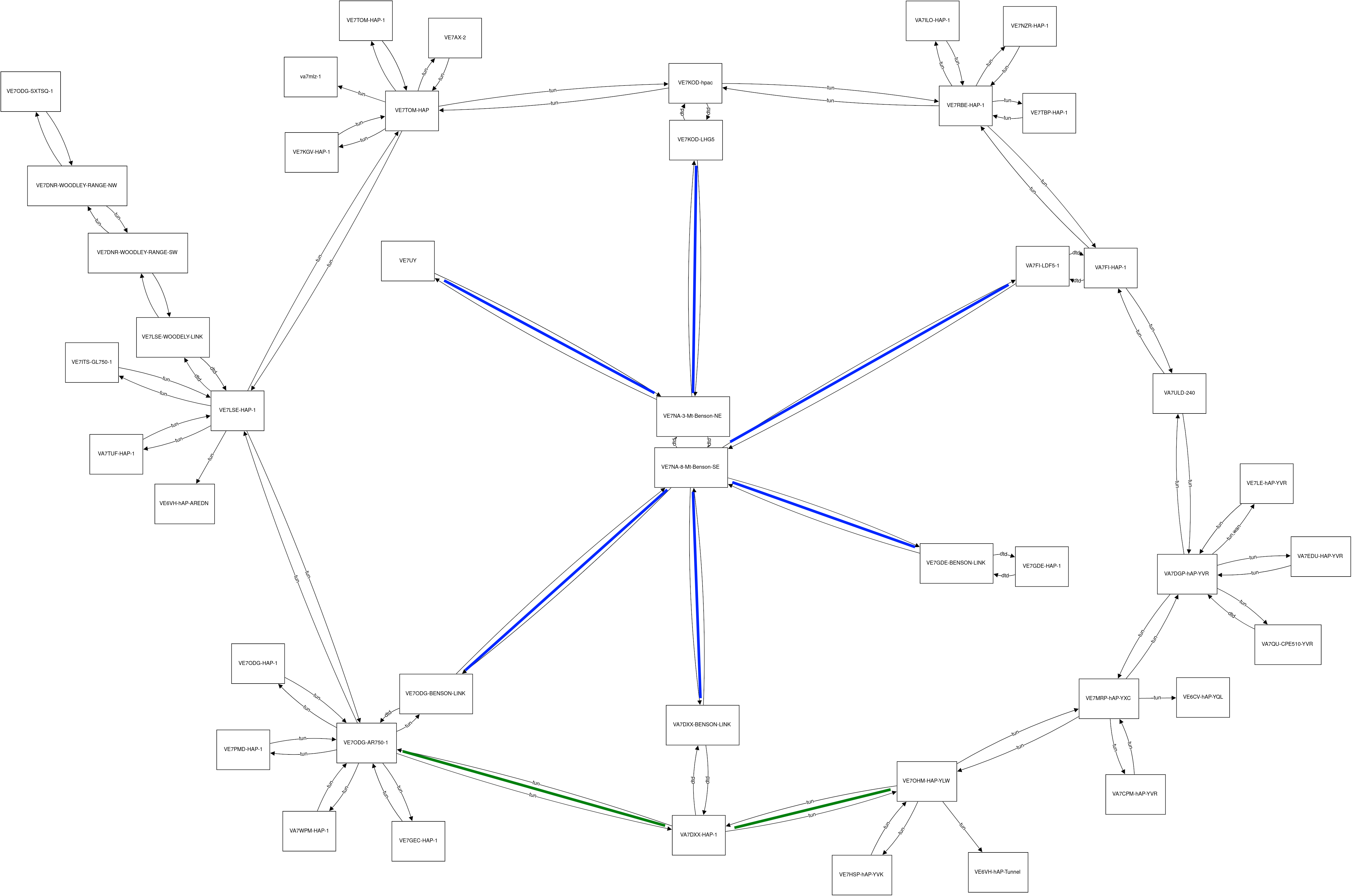
The previous picture had me wonder what a hybrid topology could look like with a star made from the mount Benson RF links, and a ring of internet tunnels around it: 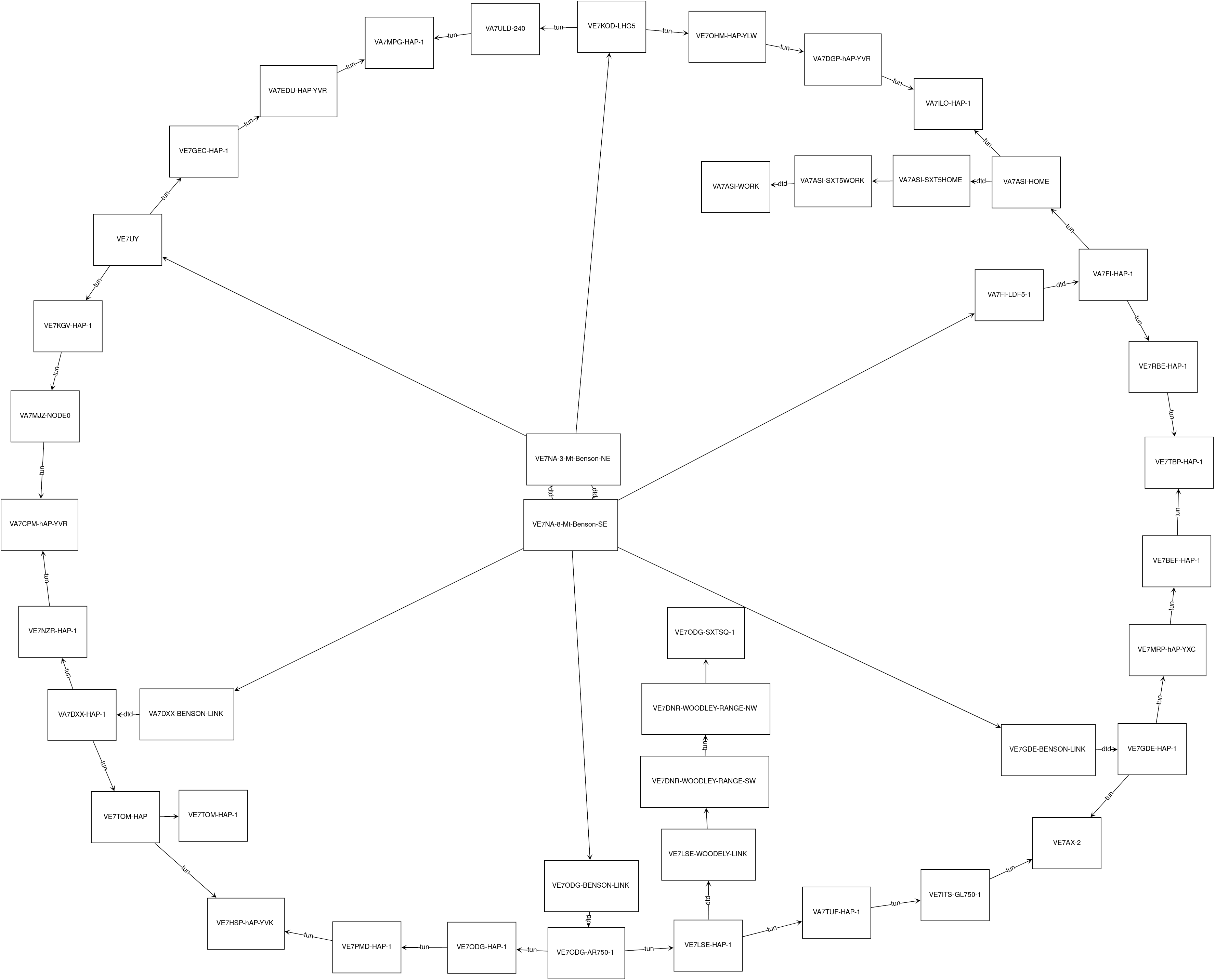 A few things to note here:
-
Over internet only, the “circumference” of the ring is 30 nodes so the furthest path would be 15 nodes long (all else begin equal).
-
Each node on the ring would have two internet paths to any other node (a short path and a long path) so no single node outage could take out the network.
-
And each node also has an additional RF path through the centre.
-
This configuration has only one internet loop (of 30 nodes) since any other loop goes through the an RF link.
Now What?
I have no idea whether the Ring-Star hybrid topology would be a good idea or not. And even if it were, it would take quite a bit of coordination to implement. A quick win might be to look at the current topology and make minor adjustments. For example, by making the following changes:
Remove these links:
-
VE7LSE ↔ VE7RBE
-
VE7LSE ↔ VE7KGV
-
VE7LSE ↔ VE7GEC
-
VE7LSE ↔ VA7DXX
-
VE7LSE ↔ VE7OHM
-
VE7TOM ↔ VE7PDM
Add these links:
-
VA7DXX ↔ VE7OHM
-
VA7DXX ↔ VE7ODG
We’d have the following topology:
What do you think? Feel free to use the discussion tool below:
Python Script
I just finished writing the first working draft of a python script that loads every BC mesh status pages on a given network and builds the list of connected nodes from there. A list that took a few hours of manual work to compile, now takes about a minute and a half.
That list can then be copied into https://flowchart.fun/ to generate the chart.
I still have a few things I want to tweak, but for now it’s usable.
– [email protected] 2021/11/12 13:27
Click to display script
# -*- coding: utf-8 -*-

"""
LICENSE:
AREDN_topology.py reads all the mesh status pages available on a given network
and builds a list of connections that can be pasted into https://flowchart.fun
Copyright (C) 2021 Patrick Truchon.

This program is free software: you can redistribute it and/or modify
it under the terms of the GNU General Public License as published by
the Free Software Foundation, either version 3 of the License, or
any later version.

This program is distributed in the hope that it will be useful,
but WITHOUT ANY WARRANTY; without even the implied warranty of
MERCHANTABILITY or FITNESS FOR A PARTICULAR PURPOSE.  See the
GNU General Public License for more details.

You should have received a copy of the GNU General Public License
along with this program.  If not, see <https://www.gnu.org/licenses/>.

VERSION:
    * v2021.11.12: First working copy.
"""

import fnmatch
import urllib.request

# User Input
print('Enter the URL of your mesh status page, or simply press Enter to use')
print('  http://VA7FI-HAP-1.local.mesh/cgi-bin/mesh')
MYURL = input() or "http://VA7FI-HAP-1.local.mesh/cgi-bin/mesh"

print("Calculating time...")


# Format URL so that NODE name is in upper case:
MYSTATION = (MYURL.partition("http://")[-1].partition(".local")[0]).upper()
MYURL = "http://" + MYSTATION + ".local.mesh/cgi-bin/mesh"


# Read the content of my page
MYPAGE = urllib.request.urlopen(MYURL).readlines()


# Extract list of URLS for other stations' mesh status pages seen on my page.
URLS = []
i = 0
for i in range(len(MYPAGE)):
    line = MYPAGE[i].decode('ascii', 'ignore')
    if fnmatch.fnmatch(line, "*local.mesh*/'>*"):
        url = (line.partition("<a href='")[-1].partition("'>")[0]) + \
        "cgi-bin/mesh"
        if url[7:10] == "VE7" or url[7:10] == "VA7":  #Include BC stations only
            URLS.append(url)


# Add my URL to the list
URLS.append(MYURL)
URLS.sort()  # sort list of websites


# Create list of NODES from list of URLS
NODES = []
for i in range(len(URLS)):
    NODE = (URLS[i].partition("http://")[-1].partition(".local")[0])
    NODES.append(NODE)

print("It should take about " + str(round(len(URLS)/38, 1)) + \
        " minutes to complete.")
print()


# Get NODES connected to each station given by i
i = 0
for i in range(len(URLS)):
#for i in range(8,11):
    # Load mesh status page for ith station
    page = urllib.request.urlopen(URLS[i]).readlines()

    # Get the name of the ith station NODE from the URL
    NODE = (URLS[i].partition("http://")[-1].partition(".local")[0])
    print(NODE)

    j = 0
    k = len(page) # set this large for now
    conns = []

    for j in range(len(page)):
        #reset the conntype to empty (it could be 'dtd', 'tun', or empty)
        conntype = ""
        line = page[j].decode('ascii', 'ignore') #ignore weird characters

        # Connected NODES are located on lines after "Current Neibhbors"
        if fnmatch.fnmatch(line, "*Current Neighbors*"):
            k = j
        if fnmatch.fnmatch(line, "*local.mesh*/'>*") and j > k:
            if fnmatch.fnmatch(line, "*<small>(*"):
                conntype = (line.partition("<small>(")[-1].\
                                           partition(")</small>")[0])+":"
            conn = (line.partition("http://")[-1].partition(".local")[0])
            if conn in NODES:
                fconn = "  "+conntype +"("+conn+")"
            else:
                fconn = "  "+conntype +conn
            print(fconn)
print()
print(str(i+1)+" NODES have been analyzed.")
print("You can now copy and paste them into:  https://flowchart.fun ")
// //
Click to display output
Calculating time...
It should take about 1.2 minutes to complete.
VA7ASI-HOME
dtd:(VA7ASI-SXT5HOME)
tun:(VE7LSE-HAP-1)
VA7ASI-SXT5HOME
dtd:(VA7ASI-HOME)
(VA7ASI-SXT5WORK)
VA7ASI-SXT5WORK
(VA7ASI-SXT5HOME)
dtd:(VA7ASI-WORK)
VA7ASI-WORK
dtd:(VA7ASI-SXT5WORK)
VA7CPM-hAP-YVR
tun:(VE7MRP-hAP-YXC)
VA7DGP-hAP-YVR
tun:(VA7EDU-HAP-YVR)
tun:(VA7ULD-240)
tun,wan:(VE7LE-hAP-YVR)
tun:(VE7MRP-hAP-YXC)
VA7DXX-BENSON-LINK
dtd:(VA7DXX-HAP-1)
(VE7NA-8-Mt-Benson-SE)
VA7DXX-HAP-1
dtd:(VA7DXX-BENSON-LINK)
VA7EDU-HAP-YVR
tun:(VA7DGP-hAP-YVR)
VA7FI-HAP-1
dtd:(VA7FI-LDF5-1)
tun:(VA7ULD-240)
tun:(VE7RBE-HAP-1)
VA7FI-LDF5-1
dtd:(VA7FI-HAP-1)
(VE7NA-8-Mt-Benson-SE)
VA7ILO-HAP-1
tun:(VE7RBE-HAP-1)
VA7MJZ-NODE0
tun:(VE7TOM-HAP)
VA7MPG-HAP-1
tun:(VE7LSE-HAP-1)
VA7TUF-HAP-1
tun:(VE7LSE-HAP-1)
VA7ULD-240
tun:(VA7DGP-hAP-YVR)
tun:(VA7FI-HAP-1)
VA7WPM-HAP-1
tun:(VE7ODG-AR750-1)
VE7AX-2
tun:(VE7TOM-HAP)
VE7BEF-HAP-1
tun:(VE7ODG-AR750-1)
VE7DNR-WOODLEY-RANGE-NW
tun:(VE7DNR-WOODLEY-RANGE-SW)
(VE7ODG-SXTSQ-1)
VE7DNR-WOODLEY-RANGE-SW
tun:(VE7DNR-WOODLEY-RANGE-NW)
(VE7LSE-WOODELY-LINK)
VE7GDE-BENSON-LINK
dtd:(VE7GDE-HAP-1)
(VE7NA-8-Mt-Benson-SE)
VE7GDE-HAP-1
dtd:(VE7GDE-BENSON-LINK)
VE7GEC-HAP-1
tun:(VE7LSE-HAP-1)
tun:(VE7ODG-AR750-1)
VE7HSP-hAP-YVK
tun:(VE7OHM-HAP-YLW)
VE7ITS-GL750-1
tun:(VE7LSE-HAP-1)
VE7KGV-HAP-1
tun:(VE7TOM-HAP)
VE7KOD-LHG5
dtd:(VE7KOD-hpac)
(VE7NA-3-Mt-Benson-NE)
VE7KOD-hpac
dtd:(VE7KOD-LHG5)
tun:(VE7RBE-HAP-1)
tun:(VE7TOM-HAP)
VE7LE-hAP-YVR
tun:(VA7DGP-hAP-YVR)
VE7LSE-HAP-1
tun:(VA7ASI-HOME)
tun:(VA7DXX-HAP-1)
tun:(VA7MPG-HAP-1)
tun:(VA7TUF-HAP-1)
tun:VE6VH-hAP-AREDN
tun:(VE7GEC-HAP-1)
tun:(VE7ITS-GL750-1)
dtd:(VE7LSE-WOODELY-LINK)
tun:(VE7ODG-AR750-1)
tun:(VE7OHM-HAP-YLW)
tun:(VE7RBE-HAP-1)
tun:(VE7TOM-HAP)
VE7LSE-WOODELY-LINK
(VE7DNR-WOODLEY-RANGE-SW)
dtd:(VE7LSE-HAP-1)
VE7MRP-hAP-YXC
tun:(VA7CPM-hAP-YVR)
tun:(VA7DGP-hAP-YVR)
tun:VE6CV-hAP-YQL
tun:(VE7OHM-HAP-YLW)
VE7NA-3-Mt-Benson-NE
(VE7KOD-LHG5)
dtd:(VE7NA-8-Mt-Benson-SE)
(VE7UY)
VE7NA-8-Mt-Benson-SE
(VA7DXX-BENSON-LINK)
(VA7FI-LDF5-1)
(VE7GDE-BENSON-LINK)
dtd:(VE7NA-3-Mt-Benson-NE)
(VE7ODG-BENSON-LINK)
VE7NZR-HAP-1
tun:(VE7RBE-HAP-1)
VE7ODG-AR750-1
tun:(VA7WPM-HAP-1)
tun:(VE7BEF-HAP-1)
tun:(VE7GEC-HAP-1)
tun:(VE7LSE-HAP-1)
tun:(VE7ODG-BENSON-LINK)
tun:(VE7ODG-HAP-1)
tun:(VE7PMD-HAP-1)
VE7ODG-BENSON-LINK
(VE7NA-8-Mt-Benson-SE)
dtd:(VE7ODG-AR750-1)
VE7ODG-HAP-1
tun:(VE7ODG-AR750-1)
VE7ODG-SXTSQ-1
(VE7DNR-WOODLEY-RANGE-NW)
VE7OHM-HAP-YLW
tun:(VA7DGP-hAP-YVR)
tun:VE6VH-hAP-Tunnel
tun:(VE7HSP-hAP-YVK)
tun:(VE7MRP-hAP-YXC)
VE7PMD-HAP-1
tun:(VE7ODG-AR750-1)
tun:(VE7TOM-HAP)
VE7RBE-HAP-1
tun:(VA7FI-HAP-1)
tun:(VA7ILO-HAP-1)
tun:(VE7KOD-hpac)
tun:(VE7LSE-HAP-1)
tun:(VE7NZR-HAP-1)
tun:(VE7TBP-HAP-1)
VE7TBP-HAP-1
tun:(VE7RBE-HAP-1)
VE7TOM-HAP-1
(VE7TOM-HAP)
VE7TOM-HAP
tun,wan:(VA7MJZ-NODE0)
tun:(VE7AX-2)
tun:(VE7KGV-HAP-1)
tun:(VE7KOD-hpac)
tun:(VE7LSE-HAP-1)
tun:(VE7PMD-HAP-1)
(VE7TOM-HAP-1)
VE7UY
(VE7NA-3-Mt-Benson-NE)
47 nodes have been analyzed.
You can now copy and paste them into:  https://flowchart.fun
Note 1
To zoom in on an image, click on it once to open it in the media manager, then a second time to view it as its own, then use Ctrl++ to zoom in.
Note 2
Each node has two arrows because I counted each connection twice. Once the clients are removed from the list, the diagram will be cleaner.